Art Museum Virtual Tour Website Case Study

Problem
Project Goal
(2022) This case study is for a virtual tour website that helps teachers create a virtual field trip itinerary. The project was inspired by working at a field trip destination during the COVID-19 pandemic and seeing the drastic decline in field trips to the facility. This case study was one of three projects for the Google UX Design Professional Certification completed in August 2022. This case study was done in tandem with the virtual tour app to create one cohesive experience from app to website.
Budget cutbacks and COVID-19 have impacted the number of field trips students can experience in a year. For many students, especially in underserved communities, field trips are cut from the academic calendar when funds are limited.
Create a website which will allow teachers to create a digital field trip experience regardless of field trip budget.
Designer's Role
As this was a portfolio project for the Google UX Design Professional Certification course, I served in all roles to complete the website mock-up from start to finish. For this project, I was responsible for user research, paper and digital wire-framing, low and high-fidelity prototyping, accounting for accessibility, and iterating on designs.
Research
User Research
I created empathy maps to understand the users and identified a primary user group through research which are teachers planning field trips for their students.
This user group confirmed initial assumptions about who might use this website, but further research revealed other user groups who might benefit from the website like people who need assistive technology to experience art or navigate a museum. Other user problems included proximity and free time in accessing an art museum experience in person.
Key Challenges and Constraints
1
Budget
Main features need to be free and accessible to all user accounts
2
Time
User flow needs to be streamlined to help busy teachers save time during lesson planning
3
Sharing
Teachers want the ability to share and collaborate with other colleagues when planning field trips
4
Saving
Teachers want to work ahead and save multiple itineraries at a time to maximize lesson planning
Personas and User Journey Map
Target Audience: Teachers who regularly take students on art museum field trips impacted by budget cuts

.png)
Design
Site Map
My goal was to make strategic decisions to create a better structure within the website. User flow was a concern during the usability studies, so I wanted that top of mind while I designed the website architecture.

Paper Wireframes
I sketched out paper wireframes for the home page, two versions in two different sizes. My focus was localizing needs to the home page so users had better control over where they started in the flow depending on their needs. Because users will access the site on devices with varying screen sizes, I worked on different versions of the itinerary homepage to make sure the website would be fully responsive.


Digital Wireframes
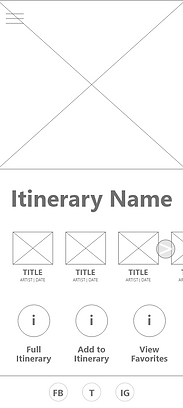
Moving to digital wireframes, I wanted to prioritize the user flow from the home page and moved all essential buttons to be more visible. My goal between the two size variations was to keep essential functions highly visible so users could view their itinerary, add to it, and navigate to other portions of the website with ease.


App Low-Fidelity Mock Up
To create the low-fidelity prototype, I connected all screens in the main user flow. Now, a user could add an art piece to the itinerary, add from their favorites, and start the virtual tour.

Usability Testing
Usability testing participants were all teachers currently teaching art or history classes and who regularly (ie. at least once a year) take a group of 5 or more students to an art museum. The participant demographics were: two male, two female, and one nonbinary identifying individuals, between the ages of 20 and 65. The research goal was to figure out if users are able to create an itinerary that fulfills their needs.
Research Questions
-
How long does it take for a user to create an itinerary with at least five art pieces?
-
How long does it take for a user to find a specific artist/art movement/art piece?
-
What parts of the app were most important and least important to creating their itinerary?
-
Are there any parts where users are getting stuck?
-
What can we learn from the steps users take to create an itinerary?
Major Findings
-
Adding art to the itinerary was difficult
-
Users wanted an easier way to move forward and backwards with the flow
-
Users want a search feature to find art easier
App Mock Ups
Based on the insights from the first usability test, I simplified the home page to include important user flow tasks without compromising the bold, modern design. Removing the bulky buttons guaranteed that they would not disappear below the fold when the user loaded the home page.
Before Usability Test
After Usability Test


App High-Fidelity Prototype
The hi-fi prototype followed a similar user flow as the lo-fi prototype with navigational edits to make backtracking easier and better placement of the main content above the fold. Video content was added to show visual potential for the home page hero image.

Conclusions
“I could see myself using this to help teach art in my classes.”
- Usability study participant
Many users saw a real-world application for this service and would want to see more museums implement a virtual tour experience. While designing the art museum virtual tour website, I learned that the user flow isn’t necessarily linear. Usability studies showed how there are multiple paths a user can take and there needs to be flexibility in how a user moves forwards and backwards within the experience.
Next Steps
During user research, other potential features were identified but not pursued because they did not address the concerns outlined in the main user flow. With more time and resources, additional features could include:
1
Itinerary
Sharing
This was identified as a smaller pain point for teachers and could be added in a future round of updates. Teachers are looking for the ability to share itinerary links to other users.
2
Real-Time Collaboration
This was identified as a smaller pain point for teachers and could be added in a future round of updates. Teachers are looking for opportunities to work on the same itinerary as another user at the same time.
3
Student Engagement
Adding a student portal where students can follow along on the virtual tour, take quizzes, submit questions, and interact in real time would provide another way to improve the virtual field trip experience.